- C++ 48%
- Python 45.7%
- CMake 5.1%
- Dockerfile 1.2%
| Filename | Latest commit message | Latest commit date |
|---|---|---|
 7084cba7db updates: - [github.com/astral-sh/ruff-pre-commit: v0.16.9 → v0.16.10](https://github.com/astral-sh/ruff-pre-commit/compare/v0.16.9...v0.16.10) - [github.com/pre-commit/mirrors-clang-format: v23.1.1 → v23.1.2](https://github.com/pre-commit/mirrors-clang-format/compare/v23.1.1...v23.1.2) Co-authored-by: pre-commit-ci[bot] <66853113+pre-commit-ci[bot]@users.noreply.github.com> |
||
| .github | ||
| fake_vel_transform | ||
| ign_sim_pointcloud_tool | ||
| livox_ros_driver2@524e14a1ec | ||
| loam_interface | ||
| pb2025_nav_bringup | ||
| pb2025_sentry_nav | ||
| pb_nav2_plugins@e6778ca44d | ||
| pb_omni_pid_pursuit_controller@b542c5794b | ||
| pb_teleop_twist_joy@becf0f61b8 | ||
| point_lio@e85e79558c | ||
| pointcloud_to_laserscan@5efaa8ba39 | ||
| sensor_scan_generation | ||
| small_gicp_relocalization@1df063ee6f | ||
| terrain_analysis | ||
| terrain_analysis_ext | ||
| .gitignore | ||
| .gitmodules | ||
| .pre-commit-config.yaml | ||
| CONTRIBUTING.md | ||
| Dockerfile | ||
| LICENSE | ||
| README.md | ||
| README_en.md | ||
pb2025_sentry_nav



Shenzhen MSU-BIT University PolarBear Robotics Team's Sentry Navigation Simulation/Reality Robot Package For RoboMaster 2025.

BiliBili: RM navigation simulation for beginners
https://github.com/user-attachments/assets/d9e778e0-fa43-40c2-96c2-e71eaf7737d4
https://github.com/user-attachments/assets/ae4c19a0-4c73-46a0-95bd-909734da2a42
1. Overview
This project is based on the NAV2 Navigation Framework and references the design of autonomous_exploration_development_environment.
-
Coordinate Transformation:
This project has optimized coordinate transformation logic significantly, considering the implicit transformation between the radar origin
lidar_odomand the chassis originodom.The Livox mid360 is mounted at an incline on the chassis and uses the point_lio as odometry, small_gicp for localization, and loam_interface will transform PointCloud from
lidar_odomframe toodomframe. The sensor_scan_generation transform PointCloud fromodomframe tofront_mid360frame and publishes the transformodom -> chassis.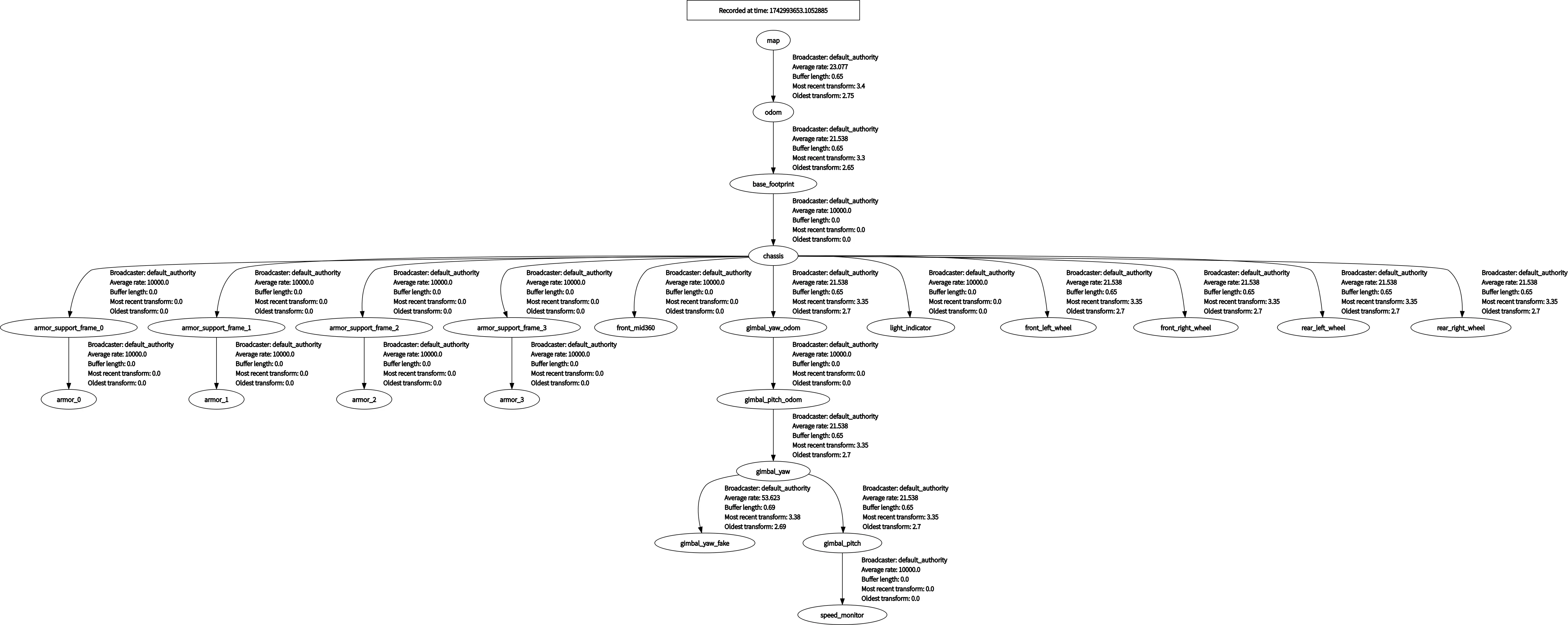
-
Path Planning:
The NAV2 default Global Planner is used as the global path planner, with the pb_omni_pid_pursuit_controller as the path follower.
-
Namespace:
To facilitate the expansion to multi-robot systems, this project uses namespaces. ROS-related nodes, topics, actions, etc., are prefixed with namespaces. To view the TF tree, use the command
ros2 run rqt_tf_tree rqt_tf_tree --ros-args -r /tf:=tf -r /tf_static:=tf_static -r __ns:=/red_standard_robot1. -
LiDAR:
The Livox mid360 is mounted at an incline on the chassis.
Note: In the simulation environment, the point cloud pattern is actually of the Velodyne-style mechanical scan. Additionally, the simulator's output point cloud lacks some fields, preventing point_lio from estimating the state correctly. Thus, the simulator’s output point cloud is processed by ign_sim_pointcloud_tool to add the
timefield. -
File Structure
.
├── fake_vel_transform                  # Virtual velocity reference frame to handle gimbal scanning mode, see sub-repository README
├── ign_sim_pointcloud_tool             # Simulator point cloud processing tool
├── livox_ros_driver2                   # Livox driver
├── loam_interface                      # Point_lio and other odometry interfaces
├── pb_teleop_twist_joy                 # Gamepad control
├── pb2025_nav_bringup                  # Launch files
├── pb2025_sentry_nav                   # This repository's package description
├── pb_omni_pid_pursuit_controller      # Path tracking controller
├── point_lio                           # Odometry
├── pointcloud_to_laserscan             # Convert terrain_map to LaserScan type to represent obstacles (only launched in SLAM mode)
├── sensor_scan_generation              # Point cloud related coordinate transformation
├── small_gicp_relocalization           # Localization
├── terrain_analysis                    # Terrain analysis within a 4m range of the vehicle, writing obstacle height above ground into the PointCloud intensity field.
└── terrain_analysis_ext                # Terrain analysis beyond a 4m range of the vehicle, writing obstacle height above ground into the PointCloud intensity field.
2. Quick Start
2.1 Option 1: Docker
2.1.1 Setup Environment
-
Allow Docker Container to access the host's X11 display
xhost +local:docker
2.1.2 Create Container
docker run -it --rm --name pb2025_sentry_nav \
  --network host \
  -e "DISPLAY=$DISPLAY" \
  -v /tmp/.X11-unix:/tmp/.X11-unix \
  -v /dev:/dev \
  ghcr.io/smbu-polarbear-robotics-team/pb2025_sentry_nav:1.3.2
2.2 Option 2: Build From Source
2.2.1 Setup Environment
-
Ubuntu 22.04
-
ROS: Humble
-
Simulation package(Option):rmu_gazebo_simulator
-
Install small_icp:
sudo apt install -y libeigen3-dev libomp-dev

git clone https://github.com/koide3/small_gicp.git
cd small_gicp
mkdir build && cd build
cmake .. -DCMAKE_BUILD_TYPE=Release && make -j
sudo make install
2.2.2 Create Workspace
mkdir -p ~/ros_ws
cd ~/ros_ws
git clone --recursive https://github.com/SMBU-PolarBear-Robotics-Team/pb2025_sentry_nav.git src/pb2025_sentry_nav
Download prior point cloud:
Prior point clouds are used for point_lio and small_gicp. Due to large file size, they are not stored in Git. Please download them from FlowUs.
Note: The performance of point_lio with prior_pcd in large scenes is not optimal, and it is more prone to drift than without prior point clouds. Debugging and optimization are ongoing.
2.2.3 Build
rosdep install -r --from-paths src --ignore-src --rosdistro $ROS_DISTRO -y
colcon build --symlink-install --cmake-args -DCMAKE_BUILD_TYPE=Release
Note
We highly recommend building your workspace using the symlink-install option since pb2025_sentry_nav extensively utilizes launch_file and YAML resources. This option installs symbolic links to those non-compiled source files meaning that you don't need to rebuild again and again when you're for example tweaking a parameter file. Instead, your changes take effect immediately and you just need to restart your application.
2.3 Running
You can start the project with the following commands. Use the Nav2 Goal plugin in RViz to publish goal pose.
2.3.1 Simulation
Single Robot:
Navigation mode:
ros2 launch pb2025_nav_bringup rm_navigation_simulation_launch.py \
world:=rmuc_2025 \
slam:=False
SLAM mode:
ros2 launch pb2025_nav_bringup rm_navigation_simulation_launch.py \
slam:=True
Save map:ros2 run nav2_map_server map_saver_cli -f <YOUR_MAP_NAME> --ros-args -r __ns:=/red_standard_robot1
Navigation mode:
Multi Robots (Experimental) :
The specified initial pose is currently invalid. TODO: Add transform and initialization for map -> odom.
ros2 launch pb2025_nav_bringup rm_multi_navigation_simulation_launch.py \
world:=rmul_2024 \
robots:=" \
red_standard_robot1={x: 0.0, y: 0.0, yaw: 0.0}; \
blue_standard_robot1={x: 5.6, y: 1.4, yaw: 3.14}; \
"
2.3.2 Physical Robot
SLAM mode:
ros2 launch pb2025_nav_bringup rm_navigation_reality_launch.py \
slam:=True \
use_robot_state_pub:=True
Save map:ros2 run nav2_map_server map_saver_cli -f <YOUR_MAP_NAME> --ros-args -r __ns:=/red_standard_robot1
Navigation mode:
Remember to change the world parameter to the actual map name.
ros2 launch pb2025_nav_bringup rm_navigation_reality_launch.py \
world:=<YOUR_WORLD_NAME> \
slam:=False \
use_robot_state_pub:=True
2.4 Launch Arguments
Launch arguments are largely common to both simulation and physical robot. However, there is a group of arguments that apply only to hardware or only to the simulator. Below is a legend to the tables with all launch arguments.
| Symbol | Meaning |
|---|---|
| 🤖 | Available for physical robot |
| 🖥️ | Available in simulation |
| Available | Argument | Description | Type | Default |
|---|---|---|---|---|
| 🤖 🖥️ | namespace |
Top-level namespace | string | "red_standard_robot1" |
| 🤖🖥️ | use_sim_time |
Use simulation (Gazebo) clock if True | bool | Simulation: True; Reality: False |
| 🤖 🖥️ | slam |
Whether run a SLAM. If True, it will disable small_gicp and send static tf (map->odom). Then automatically save the pcd_file in ./point_lio/PCD/ | bool | False |
| 🤖 🖥️ | world |
In simulation, available options are rmul_2024 or rmuc_2024 or rmul_2025 or rmuc_2025 |
string | "rmuc_2025" |
In reality, the world parameter name is the same as the file names of the grid map and prior pointcloud map |
string | "" | ||
| 🤖 🖥️ | map |
Full path to map file to load. The path is constructed based on the world parameter |
string | Simulation: rmuc_2025.yaml; Reality: AUTO_FILL |
| 🤖 🖥️ | prior_pcd_file |
Full path to prior pcd file to load. The path is constructed based on the world parameter |
string | Simulation: rmuc_2025.pcd; Reality: AUTO_FILL |
| 🤖 🖥️ | params_file |
Full path to the ROS2 parameters file to use for all launched nodes | string | Simulation: nav2_params.yaml; Reality: nav2_params.yaml |
| 🤖🖥️ | rviz_config_file |
Full path to the RViz config file to use | string | nav2_default_view.rviz |
| 🤖 🖥️ | autostart |
Automatically startup the nav2 stack | bool | True |
| 🤖 🖥️ | use_composition |
Whether to use composed bringup | bool | True |
| 🤖 🖥️ | use_respawn |
Whether to respawn if a node crashes. Applied when composition is disabled. | bool | False |
| 🤖🖥️ | use_rviz |
Whether to start RViz | bool | True |
| 🤖 | use_robot_state_pub |
Whether to start the robot state publisher 1. In simulation, since the supporting Gazebo simulator already publishes the robot's TF information, there is no need to publish it again. 2. In reality, it is recommended to use an independent package to publish the robot's TF information. For example, the gimbal_yaw and gimbal_pitch joint poses are provided by the serial communication module standard_robot_pp_ros2, in which case use_robot_state_pub should be set to False. If there is no complete robot system or only the navigation module (this repo) is tested, use_robot_state_pub can be set to True. In this case, the navigation module will publish static robot joint pose data to maintain the TF tree. Note: It is necessary to clone and compile pb2025_robot_description additionally |
bool | False |
Tip
For more details about this project and the deployment guide for the physical robot, please visit the Wiki.
2.5 Joy teleop
By default, PS4 controller support is enabled. The key mapping can be found in the teleop_twist_joy_node section of nav2_params.yaml.